Signature Font: Warm, Rounded Script for Handmade Labels & Printables
There’s that quiet moment—early morning light, coffee steaming, laptop open—when I’m finalizing a new candle label design. The scent of lavender and vanilla still lingers from yesterday’s batch, and I need a font that feels just as thoughtful: soft but intentional, friendly but refined. That’s when I reach for Signature.
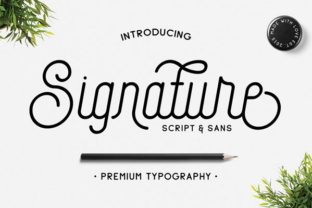
Signature isn’t just another script font. It’s a small, carefully crafted family of three styles: Signature Regular, Signature Medium, and Signature Sans. Together, they form a cohesive yet versatile toolkit—especially for makers who juggle physical products and digital downloads. The cursive script is rounded, smooth, and gently flowing—never fussy or overly formal. Its mono-weight rhythm gives it clarity at small sizes, while its open letterforms breathe easily on printed tags and cut vinyl stickers. And the companion Signature Sans? A clean, rounded sans serif that shares the same warmth and proportions—making pairing feel intuitive, not forced.
I first used Signature on a set of holiday gift tags—tiny 2”x3” kraft paper rectangles with hand-stamped borders. The script handled names and short phrases like “For You, With Love” beautifully. No awkward spacing, no cramped curves. Because Signature’s letters are designed with consistent x-height and generous counters, even at 14pt on a sticker sheet, the text stayed legible after cutting on my Cricut Maker. No pixelated edges. No lost detail in the swirls of the lowercase ‘g’ or ‘y’. That reliability matters—whether you’re printing 5 labels or 500.
It shines brightest where personality meets practicality: wedding welcome boards, boutique clothing tags, planner cover pages, printable wall art for nurseries or home offices, and even ceramic mug decals. On a linen tea towel mockup, Signature Regular added just enough charm to the phrase “Brew Well” without overwhelming the texture. On a digital printable bundle—think habit trackers and gratitude journals—the font gave headers a gentle, human touch next to crisp body text in a neutral sans serif. That contrast? It’s not just aesthetic—it guides the eye, builds hierarchy, and makes your templates feel thoughtfully designed, not assembled.
What makes Signature especially useful for handmade sellers is how it bridges display and function. It’s a display font, yes—but one built for real-world use. Unlike many ornate scripts, it avoids excessive flourishes or tight kerning that break down at small sizes or during vinyl cutting. I’ve tested it down to 8pt on matte sticker paper (for tiny jar labels), and the readability held. For longer blocks—like an “About This Candle” blurb on a product card—I’ll switch to Signature Sans or pair Signature Regular with a simple serif for balance. But for titles, names, quotes, and short decorative lines? Signature carries the weight with grace.
Pairing is effortless. I often combine Signature Regular with Inter or Manrope for digital printables—clean, free, well-hinted fonts that let the script shine without competing. For packaging mockups, I’ll use Signature Sans as a secondary font for ingredients or care instructions: same warmth, different role. And because all three weights share metric compatibility, switching between them in Canva, Illustrator, or Silhouette Studio feels seamless—not like swapping between unrelated typefaces.
Real talk: before using any font commercially—even one as maker-friendly as Signature—always check the license. The Script Amp collection includes commercial licensing by default, which means you can use Signature in physical products (candles, mugs, tote bags), digital templates (Etsy listings, PDF planners), SVG cut files, and even shop branding assets—no extra permissions needed. Just be sure your version includes OpenType features like ligatures and stylistic alternates (they’re there!), and confirm multilingual support if you’re designing for global buyers. All files come in standard formats (.otf, .ttf, .woff)—ready for desktop apps, web previews, or Cricut Design Space uploads.
I also keep a quick checklist before sending anything to print or upload:
- Test at actual size: Zoom out to 100% in your design app—does the script still feel balanced on a 3” tag or 5” greeting card?
- Check cut lines: In Silhouette or Cricut software, turn on outline view—do loops and terminals stay intact at your chosen size?
- Proofread in context: Type “The quick brown fox…” in Signature Regular—look for any awkward letter collisions (there aren’t many, but it’s smart to verify).
- Preview on device: Open your PDF on a phone screen—does the header pop? Does the script retain its softness, or does it look thin or fuzzy?
Signature works especially well for seasonal collections—think “Pumpkin Spice & Everything Nice” on autumn candle jars, “You’re Invited” on rustic wedding invitations, or “Hello, Sunshine” on summer planner stickers. Its rounded forms echo hand-drawn charm, but its precision keeps things polished. Customers don’t see “font choice”—they feel tone. Warmth. Care. Intention. That subtle shift—from generic to *yours*—often starts with something as quiet as a well-chosen typeface.
Whether you're designing for Etsy, local markets, or your own creative practice, Signature delivers more than style—it delivers consistency. Use it across your shop banner, product labels, social media story highlights, and printable thank-you cards, and your brand begins to hum with quiet cohesion. Not loud. Not flashy. Just unmistakably *you*: thoughtful, handmade, and quietly confident.
And that morning candle label I mentioned? It shipped last week—with Signature Regular on the front, Signature Sans for the scent notes on the back, and a little extra calm in every curve.