Queensha Font: Elegant Handwritten Script for Crafters & Sellers
If you’ve ever spent hours searching for a script font that feels both luxurious and approachable—something that reads beautifully on a candle label, pops on a wedding welcome board, and still cuts cleanly on your Cricut or Silhouette—you’ll understand why Queensha has become my go-to display font for physical and digital product creation.
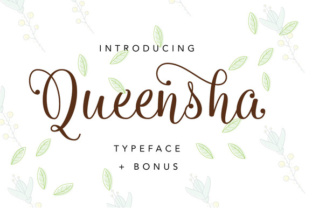
Queensha is a premium handwritten calligraphy font from Ian Mikraz Studio, thoughtfully designed as a bridge between classic copperplate discipline and modern, relaxed flow. It’s not overly ornate, but it carries undeniable elegance—smooth curves, confident contrast in stroke weight, and subtle bounce that keeps it feeling alive, not stiff. That balance makes Queensha uniquely versatile across handmade product categories where tone matters as much as legibility.
Where Queensha Shines in Real Craft Projects
I use Queensha most often for short, high-impact text: names, titles, phrases, and focal words. Think “Hand-Poured Soy Wax” on a minimalist candle label, “Est. 2022” on a boutique clothing tag, or “You’re Invited” centered on a foil-stamped wedding invitation suite. Its rhythm guides the eye without overwhelming—especially important when space is tight, like on 1.5-inch sticker labels or small gift tags.
For seasonal collections, Queensha adds warmth and intentionality. I recently used it for holiday mugs (“Warmest Wishes”) and farmhouse-style wooden signs (“Gather Here”). The font holds up beautifully at sizes from 14pt (for planner headers) to 180pt (for wall art prints), and its clean entry/exit strokes mean it cuts crisply on vinyl—even with intricate swashes enabled.
It also performs well on textured paper and kraft cardstock. Unlike some delicate scripts that blur or lose definition when printed, Queensha’s sturdy baseline and open counters keep letters distinct, even at smaller sizes. For printable planners or digital downloads, I layer Queensha over soft watercolor backgrounds or pair it with subtle line art—it never gets lost.
Readability & Production Tips You’ll Actually Use
Queensha is not ideal for long paragraphs or body text—that’s intentional. It’s a display font, built for emphasis, not endurance. But within its sweet spot (3–12 words per line), it delivers exceptional clarity. When cutting for stickers or iron-on transfers, I recommend using the standard OTF version (not the variable font) and turning off automatic kerning in your design software—this gives me more control over spacing, especially for names or monograms.
On small items like tea bag tags or mini jar labels, I avoid the extended swash alternates and stick to the base characters. They’re cleaner, more consistent, and scan better under natural light or phone camera previews. For larger signage or social media mockups, I’ll activate one or two elegant swashes—just enough to elevate, not distract.
Smart Pairings That Elevate Your Brand Identity
Queensha pairs effortlessly with clean, grounded fonts—especially geometric sans serifs like Montserrat, Poppins, or Inter. That contrast creates visual hierarchy and reinforces professionalism. On a product packaging layout, I’ll set the brand name in Queensha and ingredients or care instructions in a neutral sans serif. The result feels intentional, elevated, and trustworthy—not trendy, but timeless.
For wedding stationery, I often combine Queensha with a soft serif like Playfair Display or Cormorant Garamond. The serif adds quiet sophistication while Queensha brings personality and warmth. And if you’re designing SVG bundles for crafters, including a pairing suggestion in your product description helps buyers envision usage right away.
What’s Included & What You Need to Know
The Queensha font family includes OpenType features like stylistic alternates, ligatures, and swash capitals—great for adding subtle variation across multiple designs without repeating the same look. It supports multilingual Latin-based languages (including accented characters for French, Spanish, and German), which matters if you sell internationally or create bilingual baby shower invites.
All files are delivered in standard OTF and TTF formats—no install issues, no compatibility surprises with Canva, Affinity Designer, Adobe Illustrator, or Silhouette Studio. Just drag, install, and start designing.
Commercial Use? Yes—But Verify Your License
This is critical: Queensha is licensed for commercial use, meaning you can confidently use it in products you sell—physical items like mugs, tote bags, and greeting cards; digital products like Canva templates, printable planners, and SVG cut files; and client work like logo design or packaging projects. However, always double-check the license terms included with your purchase. Some versions may restrict redistribution of the font file itself (e.g., embedding in editable Canva templates), but usage in final artwork is fully permitted. As a small shop owner who sells printables on Etsy, I appreciate that clarity—it lets me focus on creating, not compliance.
Why Queensha Fits Into My Creative Workflow
More than aesthetics, Queensha saves me time. Its balanced metrics mean less manual kerning. Its versatility means fewer font swaps across projects. And because it reads so clearly at different scales and surfaces—from matte sticker paper to glossy ceramic mugs—it reduces customer questions about legibility or print quality.
When customers see Queensha on a product, they don’t just see pretty letters—they sense care, craftsmanship, and attention to detail. That perception translates directly into perceived value, repeat purchases, and word-of-mouth referrals. In a crowded market of handmade goods, that quiet confidence matters.
Whether you’re launching your first Etsy shop, refreshing your brand identity, or building a library of design assets for digital downloads, Queensha isn’t just another script font. It’s a reliable, expressive tool—one that works as hard as you do.